
MLA Formatting
All assignments over 250 words must be submitted as attachments as .pdf files (or .doc and .docx files). If you don’t have access to Microsoft Word (which is available, free, to SEU students here), you may use other software (like Google Docs), but work must be submitted as a .pdf file. Documents in .pages or .gdocs format will be returned.
I suggest creating a basic template for your assignments, “Save as…” the document, and submit that. Remember to UPDATE the DATE!
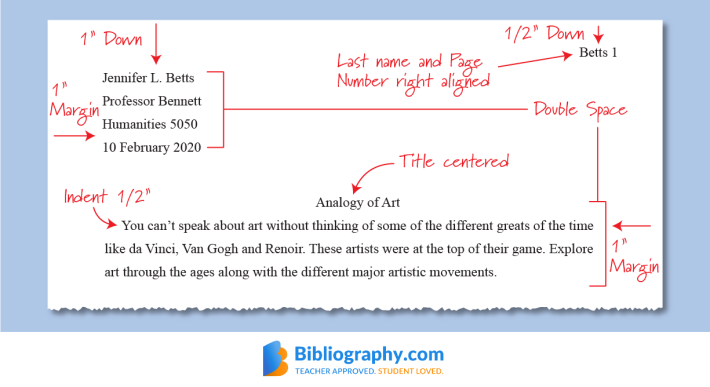
Here are the basics on MLA formatting from our online textbook: Purdue OWL: MLA Formatting.
Here is a diagram that shows the basics, including the heading on the first page:

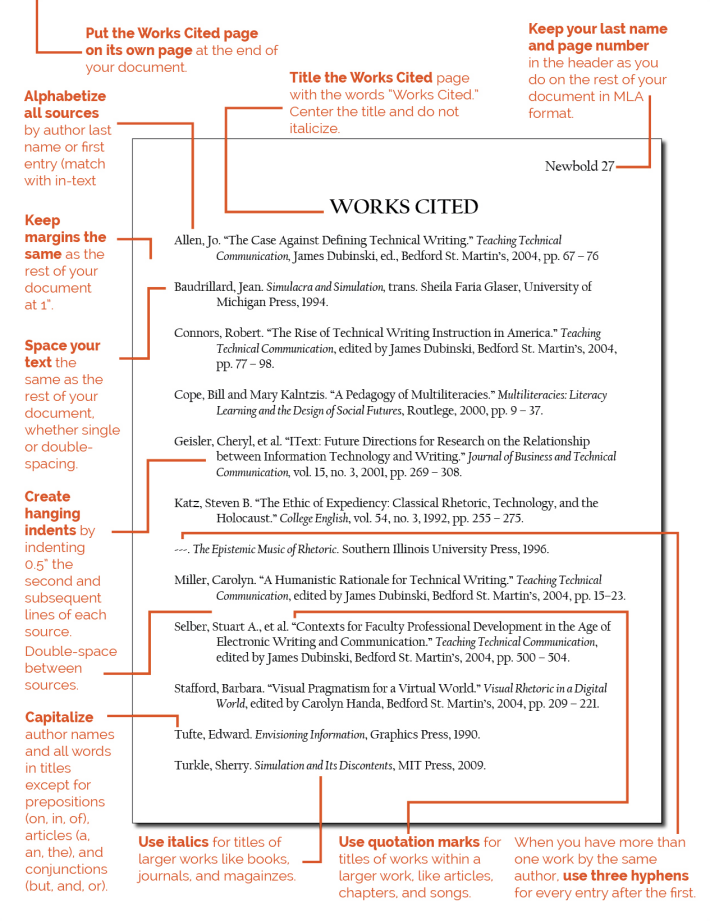
Below is a diagram of a “Works Cited” page.
Don’t enlarge the titles on your essays, as they did in this example, “Works Cited.”
Otherwise, this is a helpful diagram for learning how to format citations in MLA formatting.

Finally, if you don’t know how to create MLA formatting, there are thousands of tutorials available online. Search “MLA…” and whatever you’re trying to do, e.g., “MLA how to page numbers in Microsoft Word.”
